Concepts and Terminology
Source Data (Input Data)
Source data is data that you feed to Flexter for conversion and/or collection of Statistics to derive a Target Schema. XML and JSON documents are supported types of Source Data. XML and JSON documents can either be inside files (optionally compressed) or inside a column of a database or a column of a file, e.g. CSV, ORC. As of Flexter 1.7 we also support tables in databases and semi structured data in files, e.g. ORC, CSV etc. as Source Data.
Source Schema (input Schema)
The Source Schema is metadata for your Source Data. It is similar to a data model in a relational database. It defines data types, relationships, constraints etc. XML schema (XSD) is currently the only supported Source Schema. JSON schema is not supported at this point in time. Flexter analyses the information in the Source Schema. The output of this analysis is stored in its Metadata DB.
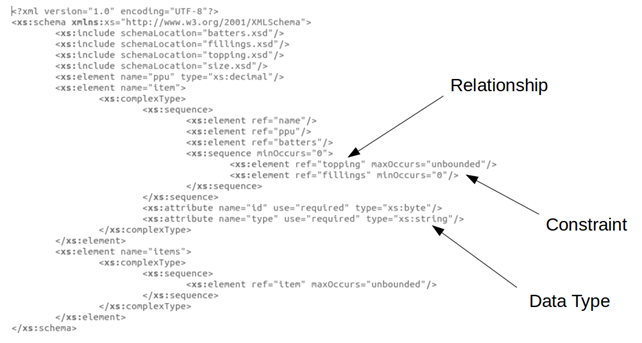
Flexter extracts relationships, constraints, data types etc. from the source schema and stores it in its metadata catalogue.
Source (Input)
The term Source either refers to the Source Data in the form of Statistics, the Source Schema or a combination of both.
Data Point
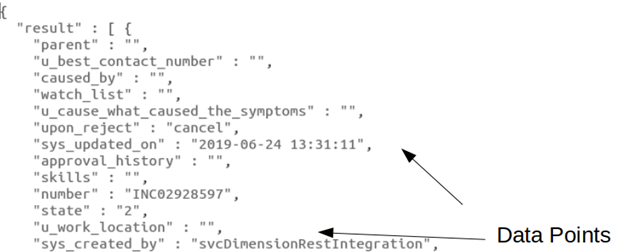
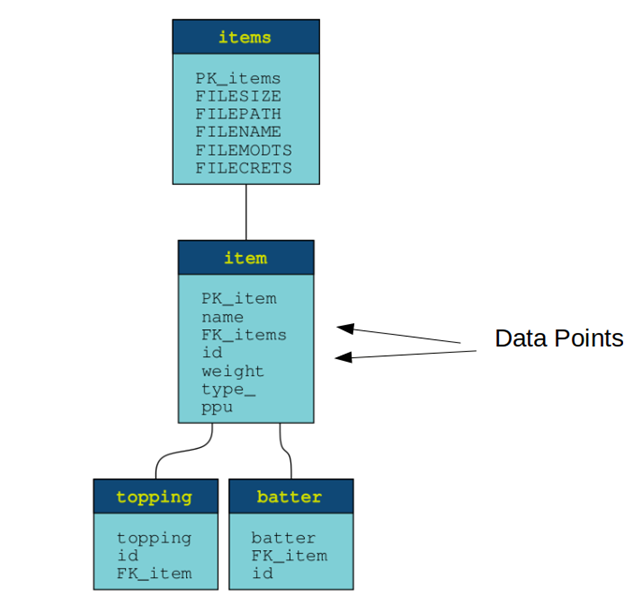
A Data Point refers to an XML element/tag, an XML tag attribute or a JSON field. It can also refer to a column in a database table or a file format.
Data Points in XML Data Points in JSON Data Points in a relational model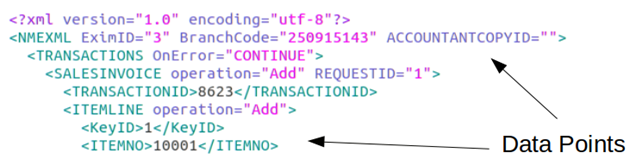
Statistics
Instead of relying on a Source Schema, Flexter can also analyse Source Data e.g. XML, JSON directly or analyse both a Source Schema (XSD) and Source Data. Flexter infers information such as data types and relationships from this analysis. The output of the analysis is called Statistics. Statistics are stored in the Flexter Metadata DB. Statistics can be collected as a standalone step or as part of a Conversion task. Statistics can also be collected incrementally from multiple batches of source data, e.g. XML documents. Deriving the Target Schema from Source Data analysis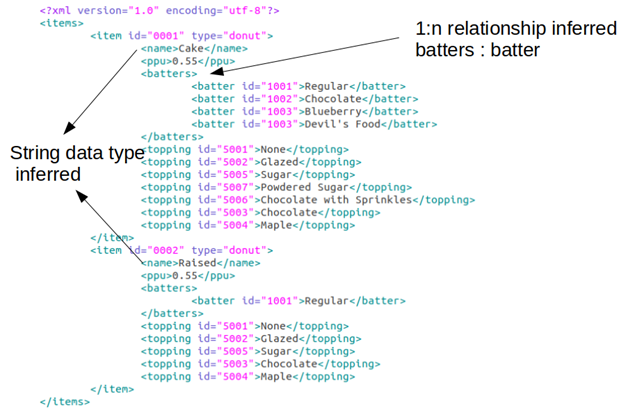
Sample of Source Data
For Statistics collection it is highly recommended to have a representative Sample of Source Data. A representative sample contains all expected Data Points in your Source Data. Not having a representative sample may lead to missing data points in the Target Schema and may lead to warnings or errors during the Conversion process. Sample Source Data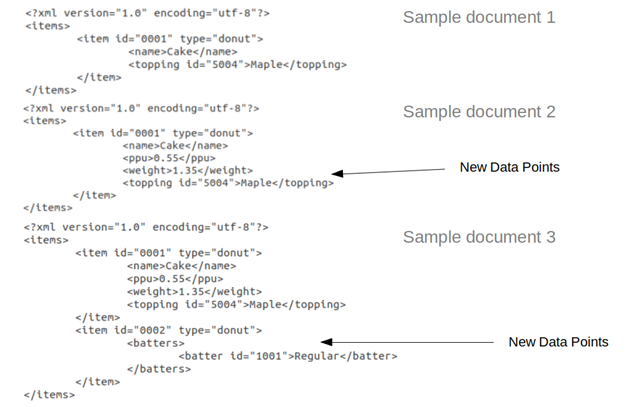
Individual XML documents may not contain all relevant data points. In the figure above XML document 2 contains the element <batters>. The first XML document does not include this element.
Incremental Statistics
You can collect Statistics incrementally. This is useful under various scenarios: (1) The structure of your Source Data changes (2) You did not have a representative sample of Source Data (3) Your data sample is too large to be analysed in a single batch Collecting Statistics incrementally. New Data Point was detected.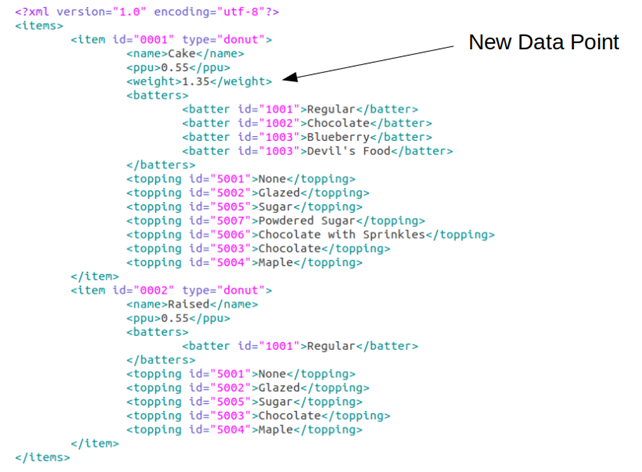
Target Schema (Output Schema)
The Target Schema is a relational representation of the Source. When you create a Target Schema, you can optionally apply Optimisations. A Target Schema is a logical representation of the target data model. A relational Target Schema that was generated by Flexter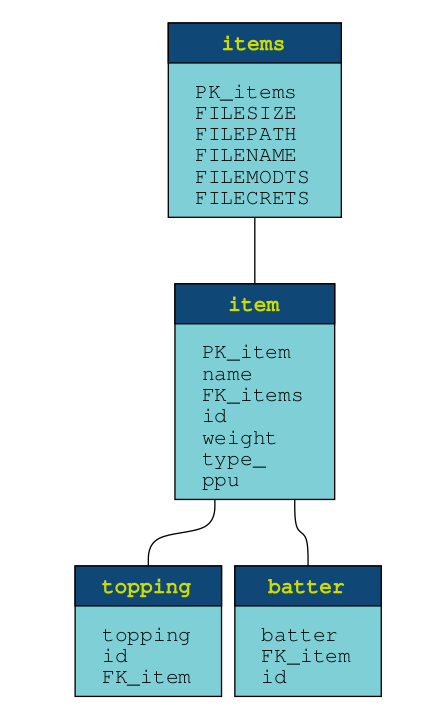
Optimisation
An Optimisation is an algorithm that can be applied when creating a Target Schema. The purpose of an Optimisation is to simplify the Target Schema. Flexter ships two Optimisation algorithms: Elevate and Reuse. Reuse only works for Source Data of type XML. It only works in combination with a Source Schema (XSD).
No Optimisation
When we don’t apply any Optimisation during generation of the Target Schema each hierarchical tag in the XML file gets its own table. This will lead to a huge number of tables. Each element in the hierarchy gets its own table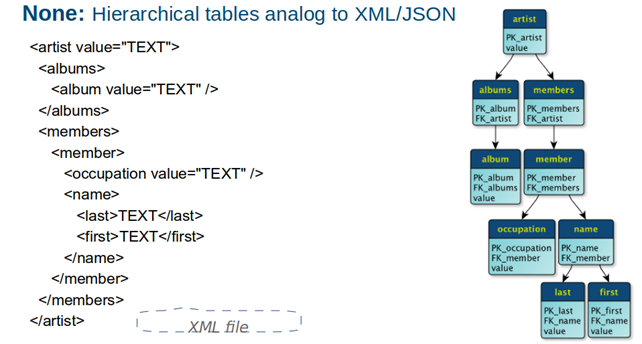
Elevate Optimisation
The Elevate Optimisation detects 1:1 relationships in the XML hierarchy. It is Flexter’s default optimisation. In the sample XSD, the relationship between Artist and Album is modelled as one-to-many (1:N). When Flexter analyses a representative sample of XML documents and only comes across 1:1 instances, it elevates the attributes of the child (album) to the parent (artist). Relationship between artist and album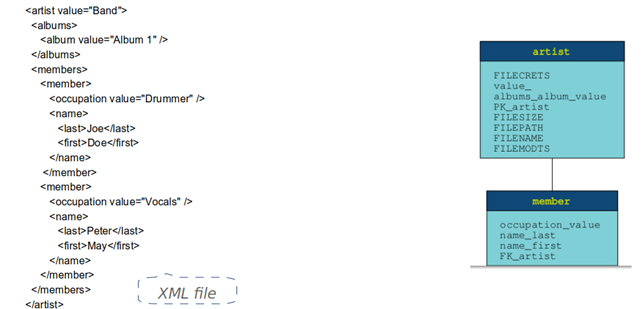
In the sample documents the relationship between artist and album is 1:1, so the attributes for the album are elevated into the artist table.
Reuse Optimisation
In an XML Schema (XSD) a type can be instantiated multiple times under different names. Flexter detects this behaviour and consolidates the information of different type instances in the same relational entity. The same type (track) is used multiple times (song, track)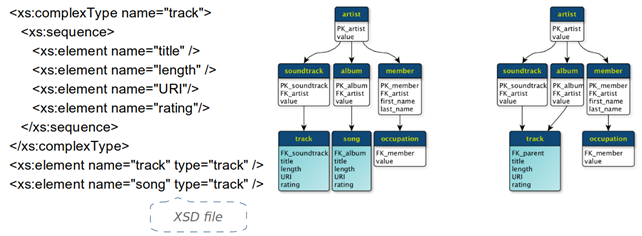
Target Format (Output Format)
A Target Format is the physical representation of a Target Schema, e.g. Oracle, CSV, Parquet, SQL Server etc. It translates the logical data types into the physical equivalent for a particular technology. Target Format represented as DDL for a SQL Server database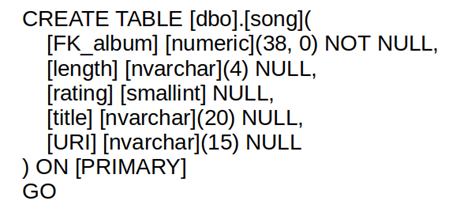
Target Data (Output Data)
Target Data is the output of a Flexter Conversion. It can be tables in a relational database or files, e.g. TSV, Parquet, Avro etc.
Metadata Database
Flexter stores any information it collects from the Source Data or the Source Schema in its Metadata DB. The Metadata DB also contains other information such as Target schema and mappings, FK relationships, user preferences (switch mappings/column/tables on/off), log of jobs, detailed log of documents processed (with summarisation of various errors in each) in a job. The Metadata DB is very useful to generate data lineage (source to target map), DDL, ER diagrams, comparisons between schemas etc. The Metadata DB is a PostgreSQL database.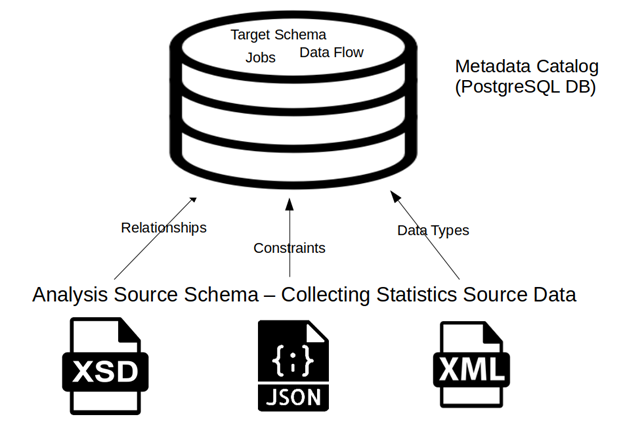
Data Flow
A Data Flow is a core concept in Flexter. It maps the data points in the Source to the data points in the Target Schema. Data Points from the Source are mapped to the Data Points in the Target Schema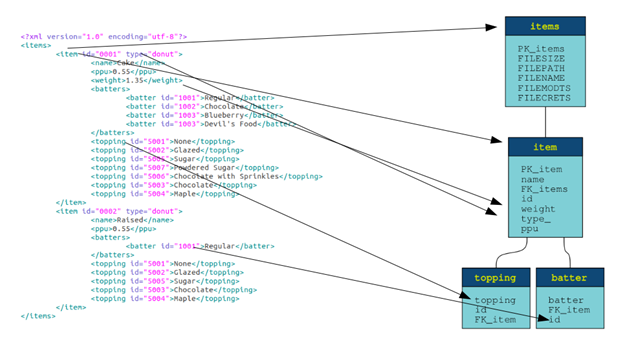
Conversion
You execute a Data Flow in a Conversion task. A Conversion transforms Source Data to a Target Format. When creating and executing a Conversion you provide a Source Connection, e.g. FTP, HDFS, network drive, HTTP etc. and a Target Connection, e.g. a connection to an Oracle database. As part of a Task you can optionally collect Incremental Statistics.
Source Connection
A Source Connection is the location (URI path) where your Source Data or Source Schema resides, e.g. a path on the file system or a JDBC connection to a database.
Target Connection
A Target Connection is a location (URI path) where the Target Data is written after a successful Conversion, e.g. the connection to a JDBC database
Job
There are three types of Jobs in Flexter.
- Collect Statistics
- Create Data Flow
- Execute a Conversion
The status of a Job can be:
- A: Active
- F: Failed
- C: Completed